How High Should You Mount a TV?
Learn how to determine the perfect mounting height for your TV based on your seating arrangement, screen size, and viewing angles to prevent neck strain and get the best picture quality.
Table of Contents16 sections
- How High Should You Mount a TV?
- Why TV Height Matters More Than You Think
- The Eye-Level Rule: The Best Starting Point
- Visual Guide: Fixed, Tilt, and Full-Motion Mounts
- When a Higher TV Placement Can Still Work
- Furniture, Soundbars, Mantels, and Decor Clearance
- Room-by-Room Recommendations
- Glare, Sunlight, and Seating Angle
- Wall Safety: Studs, Masonry, and Structural Support
- How TVPro Helps Choose the Right Height
- FAQ
- What is the best TV mounting height?
- Is it okay to mount a TV higher than eye level?
- How much space should be between the TV and a soundbar?
- How much space is needed above a mantel or dresser?
- What is better: fixed, tilt, or full-motion mount?
How High Should You Mount a TV?
For most homes, the most comfortable TV mounting height starts with one simple rule: place the center of the screen close to the eye level of a seated viewer. In many living rooms, that puts the center of the TV around 42 inches from the floor, but the final measurement should always match your sofa height, TV size, furniture below the screen, and the way your family actually watches.
At TVPro Handy Services, we do not treat TV height like a random number on a wall. We check where you sit, how far you sit from the screen, what will be under the TV, whether the screen must avoid children, whether sunlight hits the wall, and whether a fixed, tilt, or full-motion mount will make the setup more comfortable. The best TV installation is the one that looks clean and feels natural every time you watch.
️ Don't Want to Risk It?
Our certified technicians can mount your TV safely, find the perfect height, and hide all cables in as little as 1 hour.
Why TV Height Matters More Than You Think
A TV is often the visual center of the room. It is where families watch movies, sports, cartoons, news, gaming sessions, and quiet evenings together. When the screen is too high, the room may look dramatic for a moment, but the viewer often ends up lifting their chin and tightening their neck. When the screen is too low, the setup can feel awkward above furniture, soundbars, or decor. The right height creates comfort without making the wall feel empty or overloaded.
Ready for Professional Setup?
Get a free, no-obligation estimate from local certified technicians in the Greater Houston Area.
Comfort also matters for the eyes. Looking sharply upward or downward for a long time can cause faster eye fatigue and neck discomfort. This becomes even more important for older customers, people who value relaxed viewing, or anyone who watches long movies, sports events, or streaming series. The goal is simple: your head should stay in a relaxed position and your eyes should meet the center of the screen naturally.
The best TV height has to work for the main sofa, the side chairs, and the way the room is actually used every evening. This is why a professional TV mounting service should ask questions before drilling, not after.
The Eye-Level Rule: The Best Starting Point
The most reliable starting point is seated eye level. Sit in your main viewing spot—the sofa, recliner, bed, sectional, or chair you use most often—and look straight ahead. The center of the TV should land close to that natural line of sight. For many adults sitting on a standard couch, that number is around 42 inches from the floor to the center of the screen.
That does not mean every TV bottom edge should be 42 inches from the floor. A 55-inch TV, 65-inch TV, and 85-inch TV all have different screen heights, so the bottom edge changes depending on the size of the TV. The smarter way is to work backward from the center of the screen. If the center feels right, the overall viewing angle usually feels right too.
At first, many homeowners think the expert recommendation looks too low. That reaction is normal, especially if you are used to seeing TVs mounted high above fireplaces or tall furniture. But in real use, most people feel more comfortable when they look straight into the center of the screen instead of raising their head for every show.
Visual Guide: Fixed, Tilt, and Full-Motion Mounts
Choosing the right bracket type is just as important as setting the correct height. Depending on where you place your TV, different mounts solve different problems:
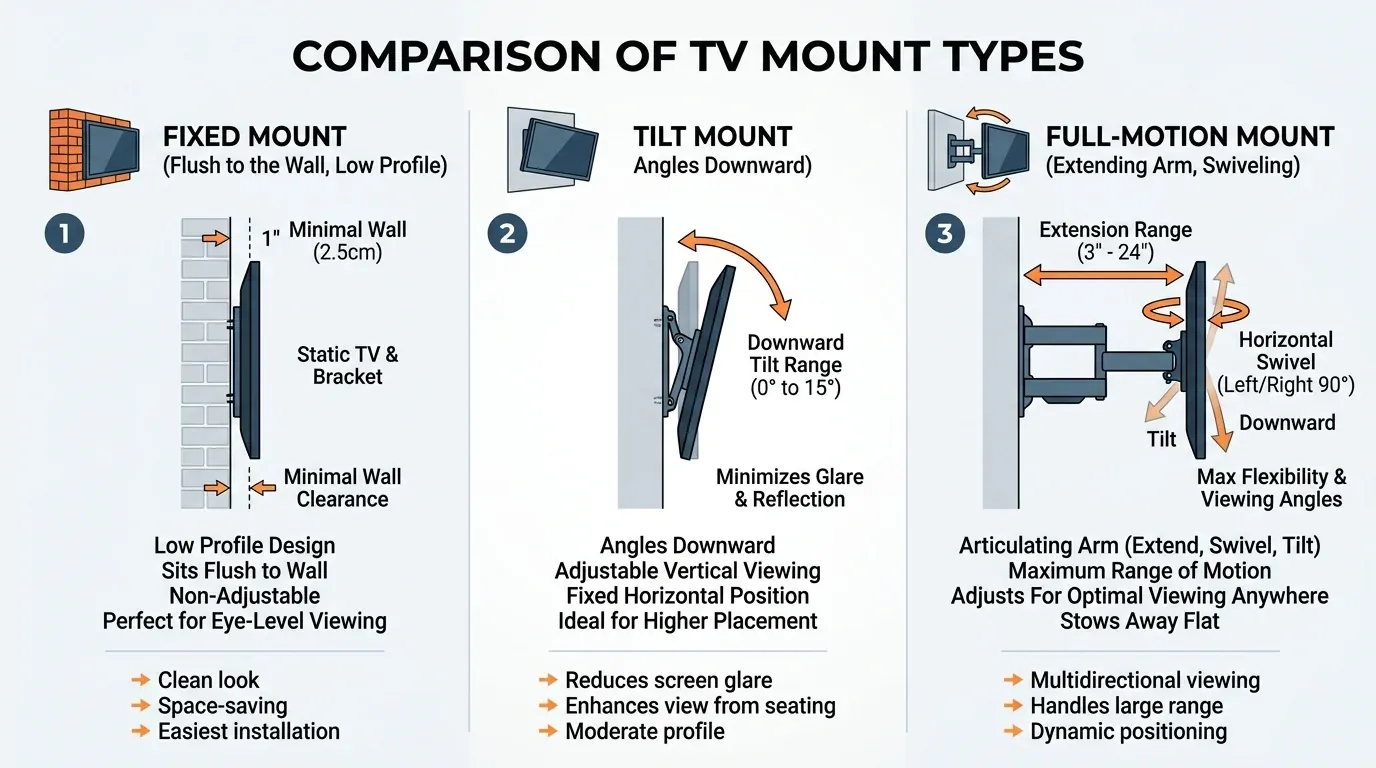
Suggested Alt Text: comparison guide between fixed mount, tilt mount, and full-motion TV wall mounts
- Fixed Mount: Best when the TV is already at a comfortable eye-level position and the seating is centered. It gives the cleanest, low-profile look, but it does not solve height, glare, or side-angle issues.
- Tilt Mount: Lets the screen angle downward, which can make a higher TV feel easier on the neck and can also help reduce reflections from windows or lights.
- Full-Motion Mount: Can pull the TV away from the wall and swivel it left or right, which is useful when seating is off-center, the room is wide, or the TV is in a bedroom or corner.
Choosing the Right TV Mount?
Not sure if you need a Tilt or a Full-Motion mount? We carry all premium mount types in our trucks and help you choose the best one on-site.
When a Higher TV Placement Can Still Work
Sometimes the TV has to sit higher. Maybe there is a fireplace mantel, a dresser, a console, a built-in cabinet, a tall soundbar, kids in the home, or a room where people watch while standing. A higher placement is not automatically wrong; it simply needs the right mount and a thoughtful angle.
This is where a tilt mount or full-motion mount when the screen has to sit higher than eye level can help. A tilt mount lets the screen angle downward, which can make a higher TV feel easier on the neck and can also help reduce reflections from windows or lights. A full-motion mount can pull the TV away from the wall and swivel it left or right, which is useful when seating is off-center, the room is wide, or the TV is in a bedroom or corner.
Furniture, Soundbars, Mantels, and Decor Clearance
Before choosing the final TV height, measure anything that will sit below the screen: TV stand, dresser, fireplace mantel, media console, soundbar, floating shelf, picture frames, plants, or decorative pieces. The wall may look empty before installation, but the space below the TV often changes once the room is finished.
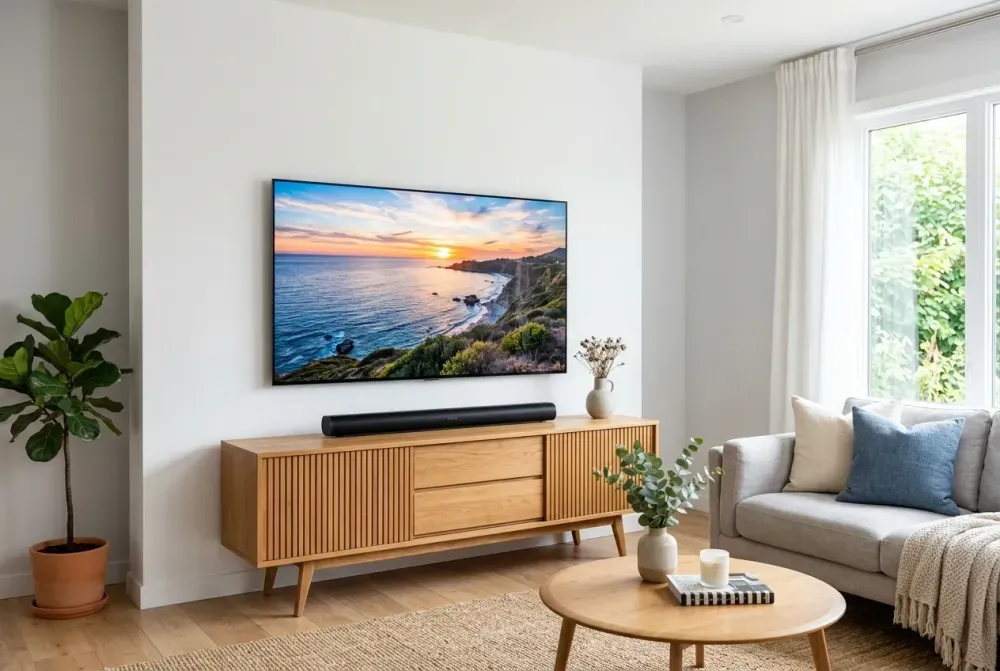
- For Soundbars: If the only item under the screen will be a soundbar, about 4 to 5 inches of clearance can often be enough for a clean look, depending on the soundbar size and wiring route. That small gap helps the TV and soundbar look connected and reduces the amount of visible cable between them.
- For Mantels & Decor: If you plan to place decor on the mantel or furniture—picture frames, candles, small vases, flowers, or seasonal items—you may want 8 to 9 inches or more. Taller decorations need more space. If the TV is raised for decor, a tilt or full-motion mount is usually worth considering so the screen still feels comfortable from the seating area.
Room-by-Room Recommendations
- Living Room or Family Room: Keep the center of the TV near seated eye level whenever possible. This is where the 42-inch center guideline is most useful. The living room is often where the TV has to serve the whole household, so comfort matters more than a dramatic high placement.
- Bedroom: If you watch from bed, your eye line is usually higher and angled differently than it is on a sofa. A bedroom TV is often mounted a little higher. A tilt mount can make the screen easier to watch while lying down. If the TV is not centered with the bed, a full-motion mount can pull out and turn toward your natural viewing position.
- Media Room, Game Room, or Man Cave: If guests watch from bar stools, pool tables, standing areas, or multiple rows of seating, the TV may need to sit higher. A center height around 57 to 60 inches can make sense in some entertainment rooms because the screen must stay visible from different parts of the room.
- Fireplace Wall: The mantel height controls the conversation. Some mantels are low and comfortable; others push the TV too high. If the bottom of the TV is 8 inches or more above the mantel, a tilt or full-motion mount can make viewing more comfortable. Always consider heat, wall structure, cable routing, and the position of the soundbar.
- Kids Room: Safety and reach matter. The TV should be comfortable from the bed or play area, but it should not be easy for children to grab, hit, climb toward, or damage. If there is a bunk bed, check the viewing angle from both the lower and upper sleeping areas.
Glare, Sunlight, and Seating Angle
Height is only one part of comfort. Windows, lamps, ceiling lights, and bright afternoon sun can create reflections on the screen. Changing the TV angle with a tilt mount or a full-motion mount can reduce glare and make daytime viewing easier.
Seating angle matters too. If the sofa is directly in front of the wall, a fixed or tilt mount may be enough. If the room has side chairs, a sectional, a bed that is off-center, or multiple viewing zones, full-motion can make the room feel more flexible. You can pull the TV out, turn it toward the viewer, and push it back when finished.
Wall Safety: Studs, Masonry, and Structural Support
A beautiful TV setup still has to be safe. The bracket should be secured into the right structure: wood studs, metal studs with proper hardware, brick, concrete, or another approved structural surface. Drywall alone is not a safe plan for a heavy TV unless the mount, anchors, wall type, and load are specifically designed for that situation.
Professional installers should check the wall before drilling, confirm the stud layout, consider plumbing or electrical lines, and choose hardware based on the wall material. This is especially important for fireplace walls, tile, stone, concrete, brick, metal studs, and large TVs.
If wires will be hidden inside the wall, the installer should also check the route for fire blocking, insulation, plumbing, and electrical lines. Regular TV power cords should not simply be run behind drywall; a proper in-wall power solution or outlet setup should be used.
How TVPro Helps Choose the Right Height
TVPro Handy Services helps homeowners choose a mounting height that fits the room, not just a measurement. Our technicians confirm the viewing position, ask what will be placed below the TV, check the wall type, recommend the right mount, and make sure the final setup feels clean, safe, and comfortable.
Whether the project is a living room, family room, or open-concept space, the goal is the same: balance comfort, family viewing, and a clean wall design. A TV should not feel like a black rectangle randomly placed on the wall. It should make the room feel more finished, more comfortable, and easier to enjoy.
Ready to Get Started?
Let our local, fully-insured pros mount your TV perfectly and safely. Same-day appointments are often available!
FAQ
What is the best TV mounting height?
Start with the center of the screen at seated eye level, often around 42 inches from the floor, then adjust for TV size, furniture, room use, and personal comfort.
Is it okay to mount a TV higher than eye level?
Yes, if the room requires it. A tilt mount or full-motion mount can improve the viewing angle and reduce neck strain.
How much space should be between the TV and a soundbar?
Many clean setups use about 4 to 5 inches, depending on the soundbar, cable route, and wall layout.
How much space is needed above a mantel or dresser?
If you want decor under the TV, plan for about 8 to 9 inches or more, depending on the items you want to display.
What is better: fixed, tilt, or full-motion mount?
Fixed is clean and low-profile. Tilt is better for higher installations and glare. Full-motion is best for bedrooms, corners, open rooms, and off-center seating.